Reopen a closed request
A request that has been declined, canceled, completed, or closed can be reopened if you meet the following criteria:
- You are the user who declined or canceled the request.
- You have one of the following permissions:
- Approve requests or Approve on Behalf of Others to reopen a declined or canceled request
- Close Requests to reopen a closed request
- Complete Requests to reopen a completed request
| Example: If a technician accidentally completes a request before the work is finished, they can reopen that request. |
- Select Requests > Closed Requests.
- Click the Request ID you want.
- Click the status drop-down to select ReOpen.
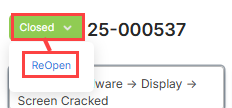
Requests reopen in one of the following statuses:
- Assigned: Request was assigned to the user that completed the request, but work has not started.
- Pending: Request is awaiting approval.
- Pending Approval: Request was awaiting approval from a user in the approval path. The request goes to that same person for approval.