Integrate with Facilities Schedules
You can set up a direct integration between IT Asset Manager and Facilities Schedules. This lets you create requests, such as setting up or tearing down an assembly, based on events entered through Facilities Schedules.
Users with the Manage Users and Permissions user permission can set up the integration.
To set up the connection to Facilities Schedules:
- Select Settings > Integrations > Facilities Schedules Integration. The Facilities Schedules Integration page appears.
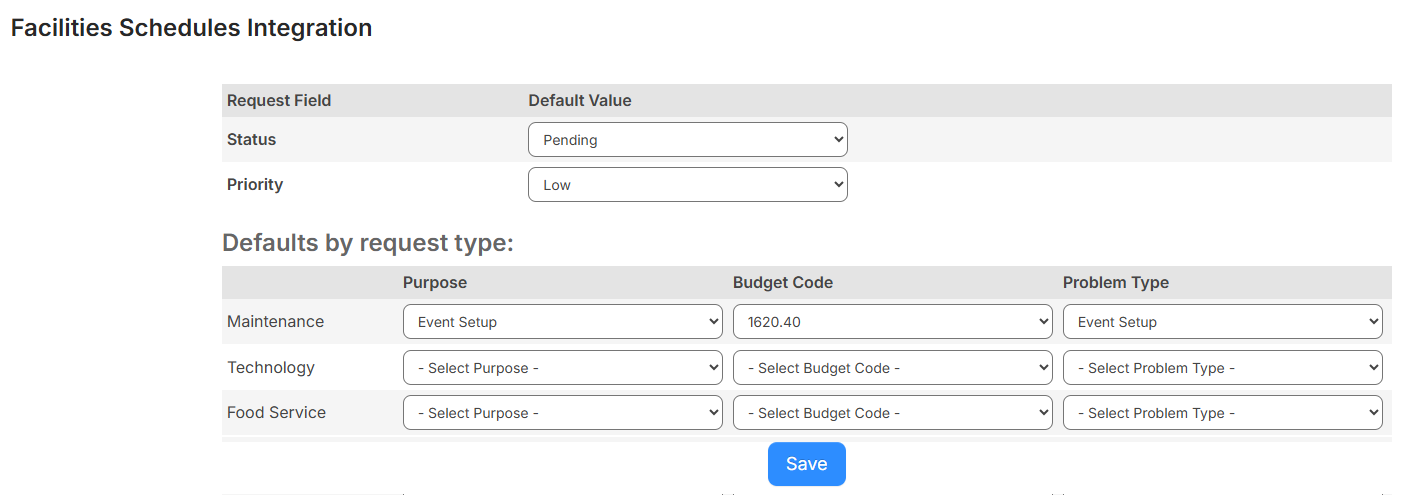
- For each request type created from Facilities Schedules events, select the following:
- Purpose
- Budget Code
- Problem Type
- Status
Note: If you will auto-assign the request, select Assigned to skip the pending and approval phases. If the request should go through approval, select Pending (you can auto-assign in step 6, once the request is approved). If the request does not need to go through approval, but should be assigned, select Approved (if you choose not to use step 6.)
- Priority
- Click Save.
Next, you need to update Building Settings if you want to auto-assign requests when they are created from Facilities Schedules.
Note: This is optional and only required if you select Active as the default Status. If you do not want to auto-assign all requests, you can auto-assign as needed.
- Select Locations > Manage Buildings. The Manage Buildings page appears.
- To add a new building, click + Add Building. Otherwise, to edit an existing building, next to the building, click
 .
. - In the Request Type section, select the Users assigned to work on requests created in Facilities Schedules.
- Click Save.