Integrate with Jamf MDM
If your district uses Jamf Pro or Jamf School, you can integrate either with IT Asset Manager to sync your assets.
Users with the Manage Users and Permissions user permission can set up the integration.
|
Important: Because of the technical knowledge required, your district’s IT administrator (or someone with a similar role) should perform this procedure to integrate Jamf. |
|
Notes:
|
 Set up the Jamf Pro integration
Select Settings > Integrations > Jamf Integration.
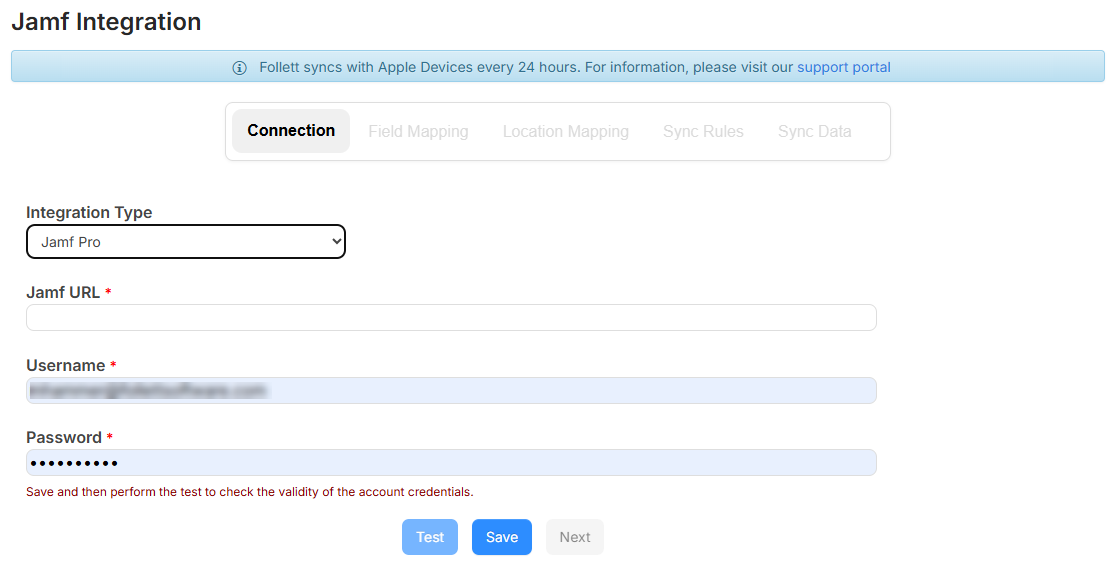
Step 1: Connection tab
|
Note: Contact Jamf support or refer to the Jamf help documentation if you have trouble accessing the information needed to set up the integration. |
To set up a link to Jamf Pro:
- From the Integration Type drop-down, select Jamf Pro.
- Enter the Jamf URL for your Jamf Pro instance.
- Enter your Jamf Pro admin account Username and Password.
- Click Save.
- To test the connection with your credentials, click Test.
Note: Once the integration is active, a green banner message appears at the top-left.
- Click Next to go to the Field Mapping tab.
Step 2: Field Mapping tab
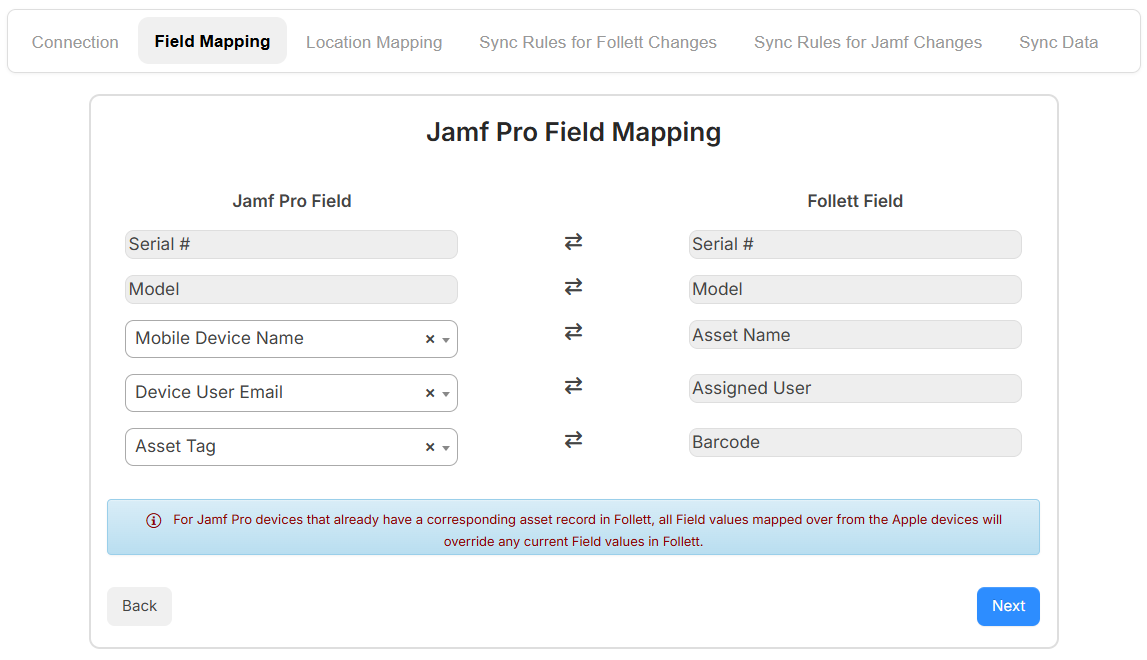
The Serial # and Model fields are automatically mapped.
|
Note: If the Serial # field matches in both systems, the existing asset is updated. Otherwise, a new asset record is created. |
Select the Jamf Pro field you want to map to the Asset Name, Assigned User, and Barcode fields. The following fields are options:
- Serial #
- Mobile device name
- Device User Email
- Asset Tag
Click Next to go to the Location Mapping tab.
Step 3: Location Mapping tab
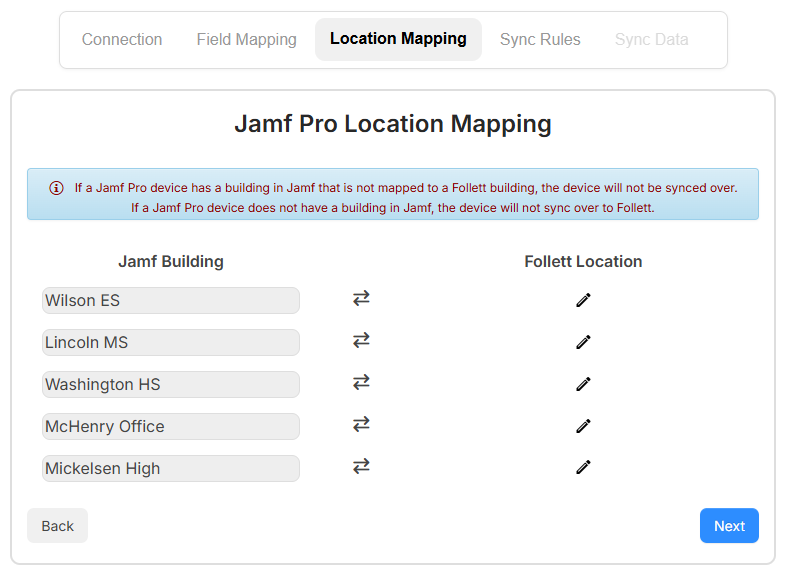
Use the Location Mapping tab to map each applicable Jamf Building to a Follett Location.
|
Notes:
|
To set up location mapping:
- Click
 . A drop-down appears.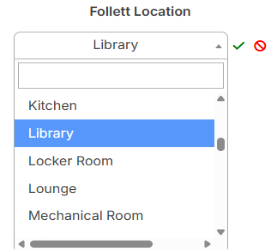
- Choose the location that the devices for this building will map to.
- To save the location, click
 .
. - When all the locations are mapped, click Next to go to the Sync Rules tab.
Step 4: Sync Rules for Follett Changes tab
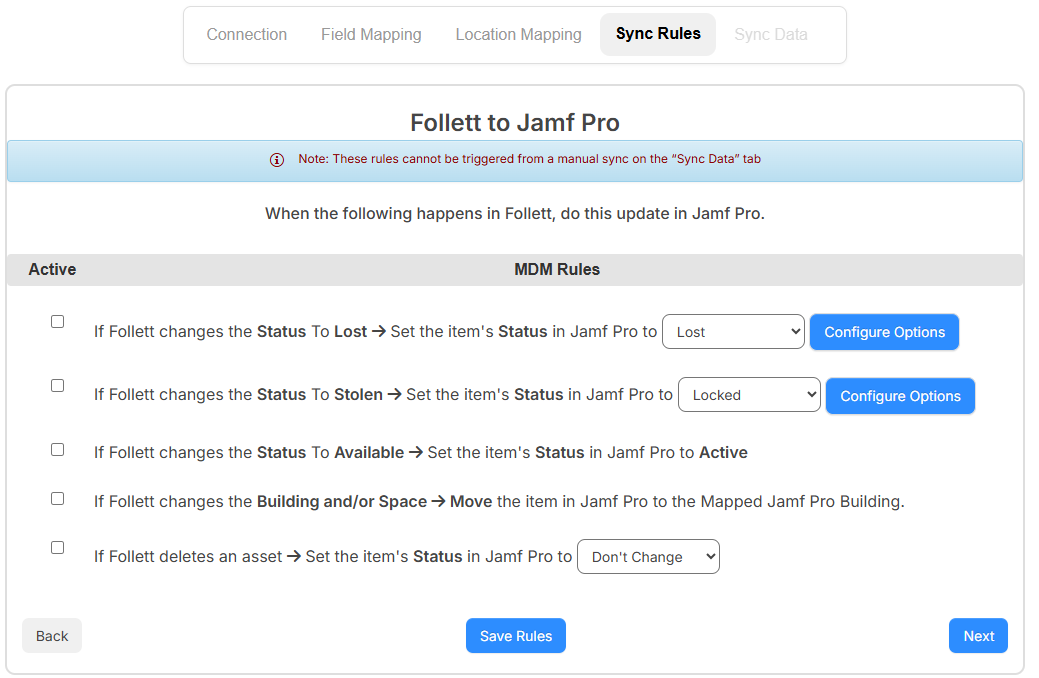
Use this tab to customize the sync rules of how to update Jamf when changes occur in IT Asset Manager.
To set up the Follett changes sync rules:
- Select/deselect the If Follett changes the Status to Lost > Set the item's Status in Jamf Pro to checkbox to enable/disable from syncing. From the drop-down, select the status.
- To set up Jamf-specific options based on what you selected in the drop-down, click Configure Options.
- Select/deselect the If Follett changes the Status to Stolen > Set the item's Status in Jamf Pro to checkbox to enable/disable from syncing. From the drop-down, select the status.
- To set up Jamf-specific options based on what you selected in the drop-down, click Configure Options.
- Select/deselect the If Follett changes the Status To Available > Set the item's Status in Jamf Pro to Active checkbox to enable/disable from syncing.
- Select/deselect the If Follett changes the Building and/or Space > Move the item in Jamf Pro to the Mapped Jamf Pro Building checkbox to enable/disable from syncing.
- Select/deselect the If Follett deletes an asset > Set the item's Status in Jamf Pro to checkbox to enable/disable from syncing. From the drop-down, select how to handle the asset.
- Click Save Rules.
- Click Next to go to the Sync Rules for Jamf Changes tab.
Step 5: Sync Rules for Jamf Changes tab
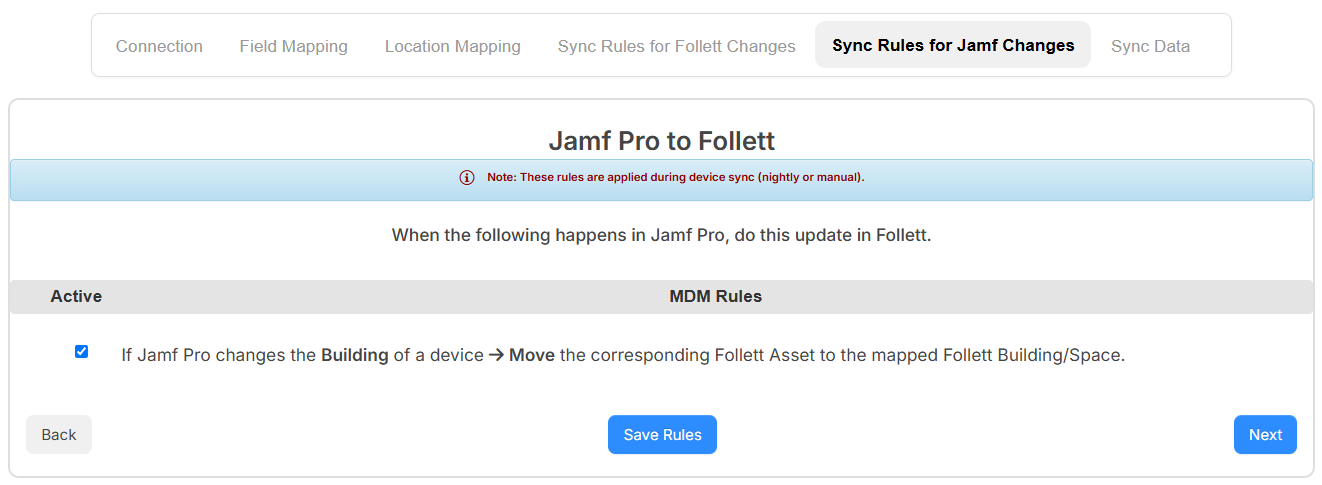
Use this tab to customize the sync rules for updating assets in IT Asset Manager when Building and Space values change in Jamf.
To set up the Jamf changes sync rules:
- Select/deselect the If Jamf Pro changes the Building of a device > Move the corresponding Follett Asset to the Mapped Follett Building/Space checkbox to enable/disable from syncing.
Note: Syncing occurs during a nightly or manual Jamf sync.
- Click Save Rules.
- Click Next to go to the Sync Data tab.
Step 6: Sync Data tab

Use the Sync Data tab to add smart and/or static device groups. The sync brings in devices tagged to a group and mapped to a location.
|
Note: Follett recommends creating a single group and adding all devices you want to sync to that group. This way, you only need to add one group. |
To add a group, and sync your devices:
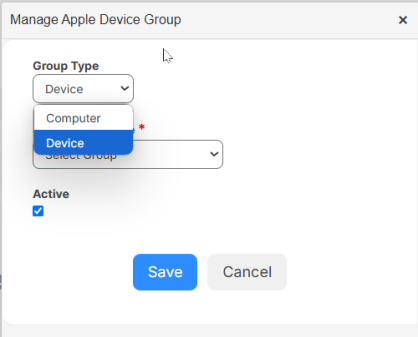
- Click + Add Group. The Manage Apple Device Group pop-up appears.
- From the Group Type drop-down, select the group you want to sync.
- To sync a group, select the Jamf Group Name from the drop-down.
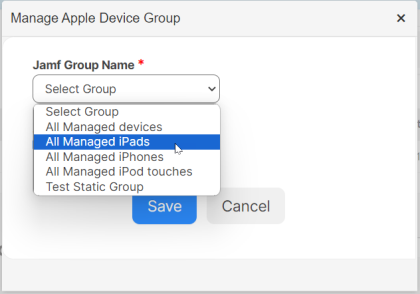
- Click Save.
- Click OK.
- To initiate a sync for the group, click
 . On the pop-up, click OK to start the sync.
 - When the sync is complete, a pop-up shows the total number of devices, total updated, total added, and total not synced. Click OK.
Set up the Jamf School integration
Select Settings > Integrations > Jamf Integration.
Step 1: Connection tab
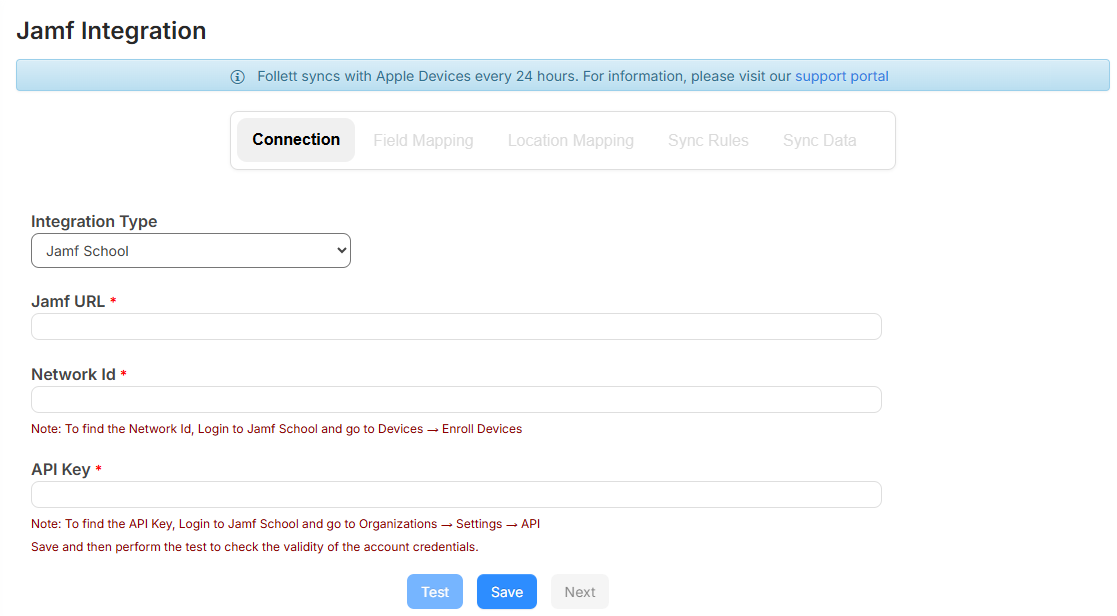
|
Note: Contact Jamf Support or refer to the Jamf help documentation if you have trouble accessing the information needed to set up the integration. |
To set up a link to Jamf School:
- From the Integration Type drop-down, select Jamf School.
- Enter the Jamf URL for your Jamf School instance.
- Enter your Jamf School Network ID.
Note: To find your Network ID in Jamf School, go to Devices > Enroll Devices.
- Enter your Jamf School API Key.
Note: To find your API Key in Jamf School, go to Organizations > Settings > API.
- Click Save.
- To test the connection with your credentials, click Test.
Note: Once the integration is active, a green banner message appears at the top-left.
- Click Next to go to the Field Mapping tab.
Step 2: Field Mapping tab
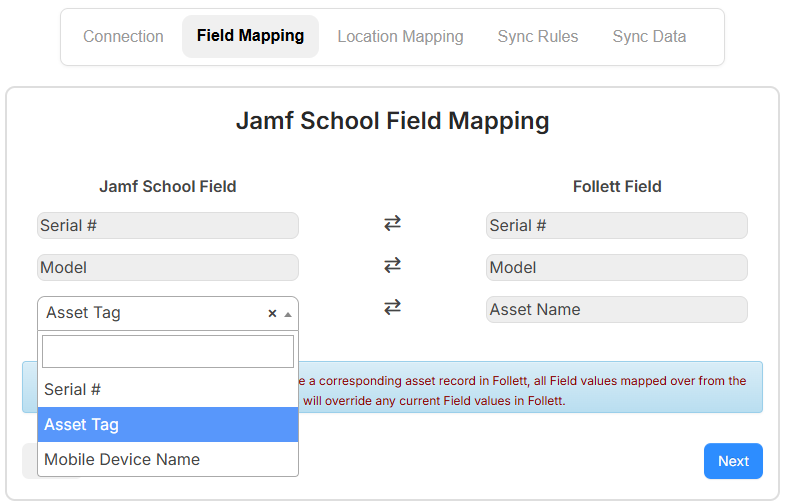
The Serial # and Model fields are automatically mapped.
|
Note: If the Serial # field matches in both systems, the existing asset is updated. Otherwise, a new asset record is created. |
To set up field mapping:
- Select the Jamf School field you want to map to the Asset Name. The following fields are options:
- Serial #
- Asset Tag
- Mobile Device Name
- Click Next to go to the Location Mapping tab.
Step 3: Location Mapping tab
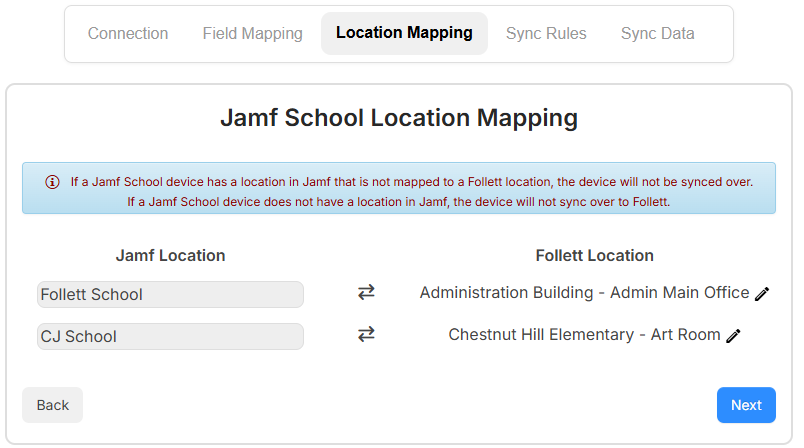
Use the Location Mapping tab to map each applicable Jamf Building to a Follett Location.
|
Notes:
|
To set up location mapping:
- Click . A drop-down appears.
- Choose the location that the devices for this building will map to.
- To save the location, click .
- When all the locations are mapped, click Next to go to the Sync Rules tab.
Step 4: Sync Rules for Follett Changes tab
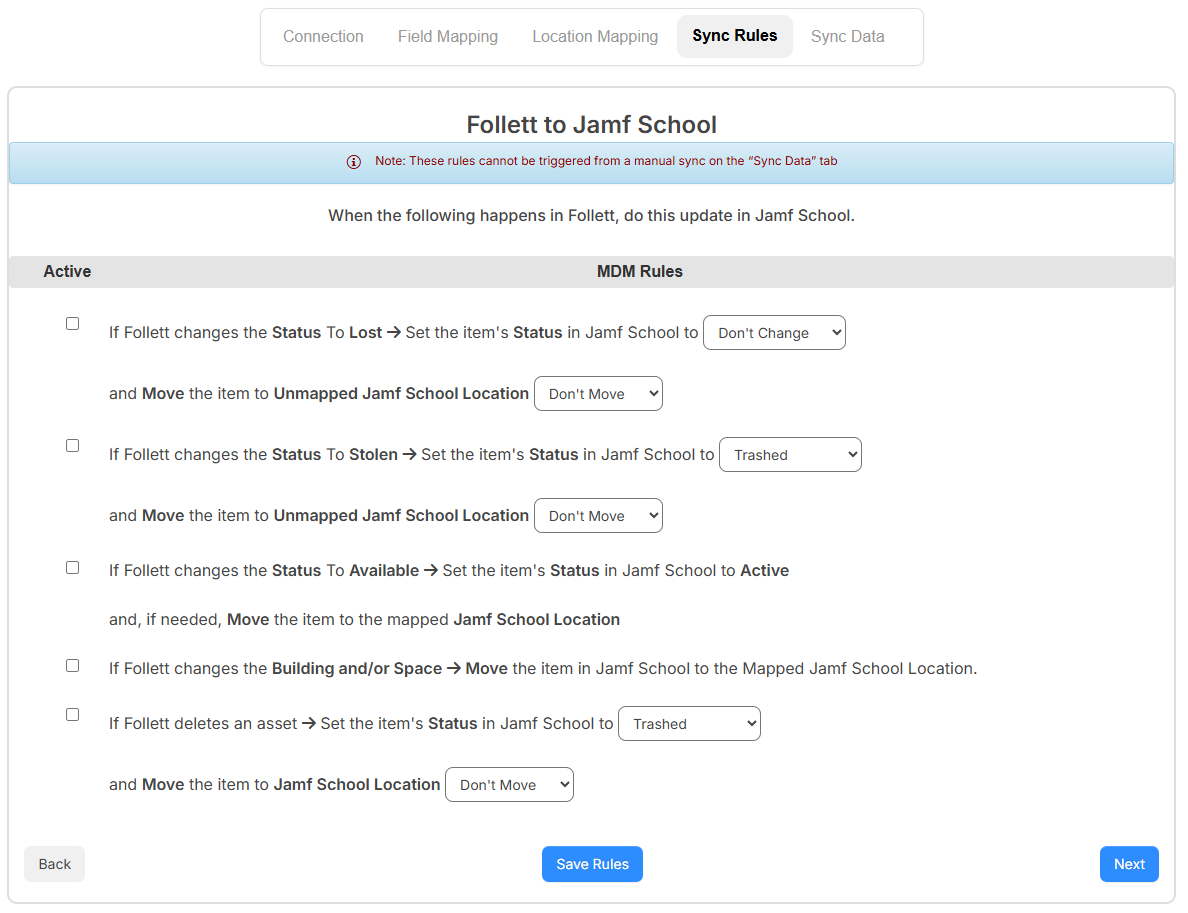
Use this tab to customize the sync rules of how to update Jamf when something happens in IT Asset Manager.
To set up the sync rules:
- Select/deselect the If Follett changes the Status to Lost > Set the item's Status in Jamf Schhol to checkbox to enable/disable from syncing. From the drop-down, select one of the following:
- Don't Change
- Trashed
- Unmanaged
- Wiped
- From the and Move the item to Unmapped Jamf School Location drop-down, select Don't Move or Don't Map Me.
- Select/deselect the If Follett changes the Status to Stolen > Set the item's Status in Jamf School to checkbox to enable/disable from syncing. From the drop-down, select one of the following:
- Don't Change
- Trashed
- Unmanaged
- Wiped
- From the and Move the item to Unmapped Jamf School Location drop-down, select Don't Move or Don't Map Me.
- Select/deselect theIf Follett changes the Status To Available > Set the item's Status in Jamf School to Active and, if needed, Move the item to the mapped Jamf School Location checkbox to enable/disable from syncing.
- Select/deselect the If Follett changes the Building and/or Space > Move the item in Jamf School to the Mapped Jamf School Location checkbox to enable/disable from syncing.
- Select/deselect the If Follett deletes an asset > Set the item's Status in Jamf School to checkbox to enable/disable from syncing. From the drop-down, select one of the following:
- Don't Change
- Trashed
- Unmanaged
- Wiped
- From the and Move the item to Jamf School Location drop-down, select Don't Move or Don't Map Me.
- Click Save Rules.
- Click Next to go to the Sync Rules for Jamf Changes tab.
Step 5: Sync Rules for Jamf Changes tab
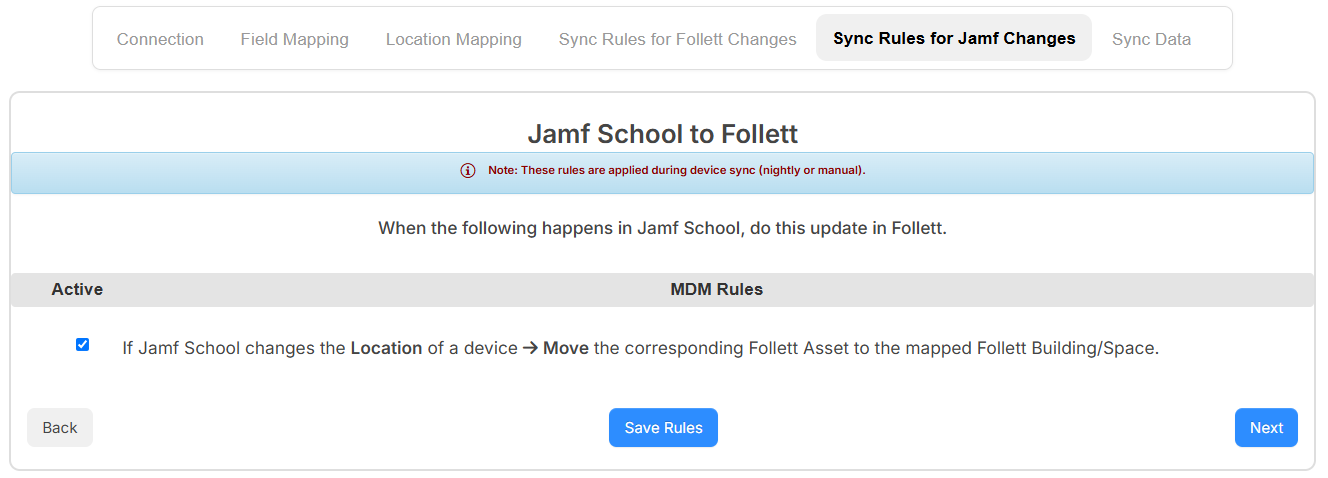
Use this tab to customize the sync rules of how to update IT Asset Manager when Building and Space values are updated in Jamf.
To set up the Jamf changes sync rules:
- Select/deselect the If Jamf School changes the Building of a device > Move the corresponding Follett Asset to the Mapped Follett Building/Space checkbox to enable/disable from syncing.
Note: Syncing occurs during a nightly or manual Jamf sync.
- Click Save Rules.
- Click Next to go to the Sync Data tab.
Step 6: Sync Data tab
Use the Sync Data tab to add smart and/or static device groups. The sync brings in devices tagged to a group and mapped to a location.
|
Note: Follett recommends creating a single group and adding all devices you want to sync to that group. This way, you only need to add one group. |
To add a group, and sync your devices:
- Click + Add Group. The Manage Apple Device Group pop-up appears.
- To sync a group, select the Jamf Group Name from the drop-down.
- Click Save.
- Click OK.
- To initiate a sync for the group, click . On the pop-up, click OK to start the sync.
- When the sync is complete, a pop-up shows the total number of devices, total updated, total added, and total not synced. Click OK.
|
Note: New devices and updates to existing assets from the MDM sync nightly, while sync rule actions are processed every 30 minutes. |
Assets that are synced from Jamf will show an Apple icon next to their name. You can click the Apple icon to open a window with all available Jamf device fields.
You can check out synced Jamf device asset records under the following conditions:
- The Jamf device asset record must have an asset status of Available or blank.
- For Jamf Pro only: The "Assigned User" is not mapped from the Field Mapping tab.